

Omn creative modes and inputs — API v2
Omn quickstart (API v2) · API and product versions
Compare conceptual shot sequences
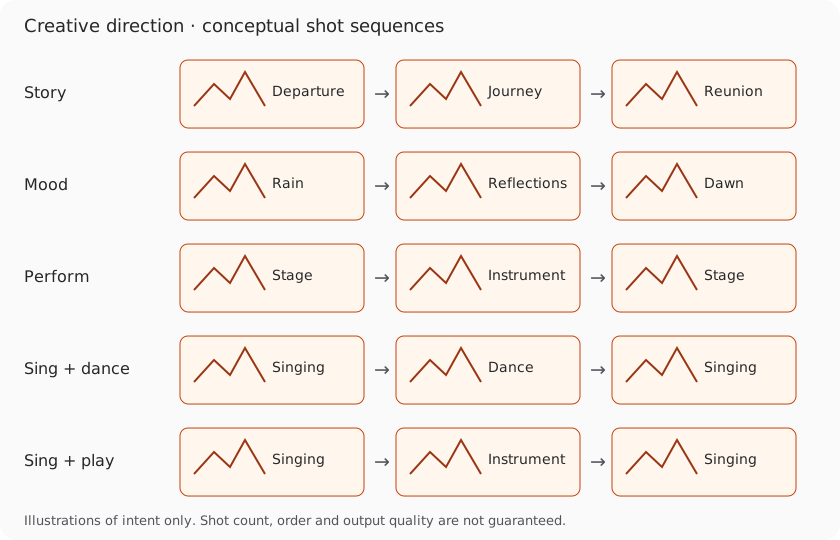
This diagram illustrates creative intent; it is not a generated sample or a guarantee of shot order.
Choose your creative result
Section titled “Choose your creative result”Use /api/v2/mv at https://api.omnapi.com with an x-api-key. Check /api/v2/mv/capabilities and the requested combination, then preflight the actual media before purchasing. Use the returned preflightId, a saved Idempotency-Key, and your maxCredits limit. See API availability.
Singing, performance and dance
Section titled “Singing, performance and dance”All modes use the same request envelope and support 540p, 720p, 1080p and 1440p output when the requested combination is ready. Account readiness does not change the parameter format: unavailable combinations are rejected before purchase.
| creative.mode | Intended result |
|---|---|
| auto | Song-led direction without required singing shots |
| story | A narrative based on lyrics or your brief |
| mood | Atmosphere and visual motifs; people are allowed |
| perform | Stage or instrumental performance without required singing |
| sing | Audio-synchronized singing shots, with optional narrative cutaways |
| dance | Dance-led movement |
| sing_dance | Singing and dancing, with an explicit combination policy |
| sing_play | Singing and instrumental performance, with an explicit combination policy |
creative.options.combination is required for sing_dance and sing_play: alternating uses separate shots; simultaneous requests both actions in the same shot. Same-shot execution is not yet verified and is rejected before debit. It is never silently replaced by alternating shots.
Dance motion reference
Section titled “Dance motion reference”For dance, references.motion accepts videoUrl, optional characterId, and required rightsConfirmed: true. The character id must identify a supplied reference. Motion reference currently requires 16:9 or 9:16. High-resolution motion output can be resized from the motion workflow’s source; output resolution is not a promise of native source generation resolution. Unsupported references are rejected before purchase.
Creative direction and visual style
Section titled “Creative direction and visual style”MV_CREATIVE_BRIEF_SONG_WORLD_CONFLICT is an advisory warning when an explicit
setting in your brief conflicts with the period or culture suggested by the
song’s lyrics, title or style tags. Omn keeps your explicit requirements and
adapts the remaining setting to the song. Review the finished video; this warning
does not by itself mean failure or change delivery or billing.
Use creative.brief for content and creative.style for visual treatment. For story, set creative.options.storySource to lyrics or brief; brief-led stories require a nonempty brief, and lyrics-led stories require available lyrics. creative.options.instrument is accepted for perform and sing_play.
Character and style prompts
Section titled “Character and style prompts”creative.characters.policy is auto, required or forbidden, with optional count (1–2). Singing, performance and dance require people. Forbidden characters conflict with those modes and with supplied character references.
references.characters contains up to two {id, imageUrl, description?} entries with unique ids. references.styles and references.locations each accept up to three image URLs. Secondary character, style and location images together must not exceed six. References have the same shape at every resolution. Character images are optional; the service can create identities.
Duration and long songs
Section titled “Duration and long songs”Use source.type=audio_url with url, or source.type=suno_clip with clipId. Both accept optional lyrics and range: {startSec, endSec}. Effective duration is verified from the audio, with a 10-second minimum and a maximum of 600 seconds subject to runtime admission. Clients do not supply a trusted duration for purchasing.
An explicit creative.characters.count is used even when the character policy is auto. Use forbidden to prohibit characters; it cannot be combined with a positive count.
Subtitles
Section titled “Subtitles”Choose a subtitle policy
Section titled “Choose a subtitle policy”captions.mode is off, auto or provided. Provided captions require captions.srtUrl; other modes reject that field. SRT cue times are relative to the selected audio segment, starting at zero. Optional language is auto, en or zh. required: true prevents delivery from silently dropping requested subtitles; it cannot be combined with off.
Automatic lyrics and timing remain machine estimates. Supplied lyrics help recognition but do not independently certify timing. Review warnings and the finished video. Disabling captions does not prevent lyric recognition for song understanding.
Compare full requests for the same song
Section titled “Compare full requests for the same song”These five complete preflight requests keep the song, output resolution and captions unchanged. Replace the URL with your audio, submit only the variant you choose to POST /api/v2/mv/preflight, then use its returned receipt to purchase. Reference images are optional and omitted here.
| Goal | Changed creative fields | What stays the same |
|---|---|---|
| Story | mode: story, brief and storySource: brief | Audio, 720p, 16:9, captions off |
| Mood | mode: mood, atmosphere brief | Same |
| Performance | mode: perform, instrument | Same |
| Singing and dance | mode: sing_dance, combination: alternating | Same |
| Singing and playing | mode: sing_play, instrument and alternating | Same |
For auto, omit creative options and let the song guide the plan. For sing, use mode: sing; for dance alone use mode: dance. Same-shot simultaneous combinations remain rejected before purchase.
story example
Section titled “story example”{ "source": { "type": "audio_url", "url": "https://media.example.com/song.mp3" }, "creative": { "mode": "story", "brief": "A traveler follows a paper bird through a rainy hometown", "options": { "storySource": "brief" } }, "output": { "resolution": "720p", "aspectRatio": "16:9" }, "captions": { "mode": "off" }}mood example
Section titled “mood example”{ "source": { "type": "audio_url", "url": "https://media.example.com/song.mp3" }, "creative": { "mode": "mood", "brief": "Rain, reflected neon and empty streets at dawn" }, "output": { "resolution": "720p", "aspectRatio": "16:9" }, "captions": { "mode": "off" }}perform example
Section titled “perform example”{ "source": { "type": "audio_url", "url": "https://media.example.com/song.mp3" }, "creative": { "mode": "perform", "brief": "A guitarist plays under warm stage lights", "options": { "instrument": "guitar" } }, "output": { "resolution": "720p", "aspectRatio": "16:9" }, "captions": { "mode": "off" }}sing_dance example
Section titled “sing_dance example”{ "source": { "type": "audio_url", "url": "https://media.example.com/song.mp3" }, "creative": { "mode": "sing_dance", "brief": "A singer alternates vocal closeups with dance shots", "options": { "combination": "alternating" } }, "output": { "resolution": "720p", "aspectRatio": "16:9" }, "captions": { "mode": "off" }}sing_play example
Section titled “sing_play example”{ "source": { "type": "audio_url", "url": "https://media.example.com/song.mp3" }, "creative": { "mode": "sing_play", "brief": "A singer alternates vocal closeups with guitar performance", "options": { "combination": "alternating", "instrument": "guitar" } }, "output": { "resolution": "720p", "aspectRatio": "16:9" }, "captions": { "mode": "off" }}Reuse a creative version
Section titled “Reuse a creative version”The current development contract also describes optional creative.continuity.
Omit it for an independent request. GET /api/v2/mv/creative-projects lists your
reusable projects and revisions with task:read. Reuse a returned projectId
and revisionId only with the matching audio source and creative mode; a mismatch
returns a conflict. sourceScope declares full_song, fragment or unknown
(default). boundaryPolicy is excerpt (default) or standalone, describing
how the selected range relates to the song.
DELETE /api/v2/mv/creative-projects/{id} archives a project with task:create.
This does not purchase generation. Check availability in your deployed API before
relying on this development-contract addition; it is separate from the verified
availability of the core API v2 create workflow.
For an existing API v1 integration, use generation.creativeMode and API v1 options. These field names cannot be mixed with API v2 requests.